Showing posts with label Java. Show all posts

Friday, April 3, 2020

Non-blocking I/O(NIO) File handling operations

In this post I will list down some of common file operations which encounter in day today basis when working. Following are required to run the provided project shared at end of the post.

Prerequisites 
  1. You should have install java 1.8 or above.
  2. You should have Eclipse installed in your PC.
  3. Your PC should setup Maven installed and configured.


Create Files

For this one also we can use Files.createFile method in java.nio.file.Files class. For this method we need to provide Path object of new file.  Note that this method will throw java.nio.file.FileAlreadyExistsException when file already existing. As you can see sample code in createFile() method.


String parentFolderPath="C:\\JAVA8_FILE_HANDLING\\src\\main\\resources\\PARENT_FOLDER\\";

File newFile= new File(parentFolderPath+"Test.txt");

if(!newFile.exists())
    Files.createFile(newFile.toPath());

System.out.println("Newly created file exists :: "+newFile.exists());


List everything in a folder
For listing of folder we can useFiles.list method in java.nio.file.Files class. For that method we can pass the folder path which we need to list down. Note that this list method will throw IOException so we have to handle it in our code. You can see sample code in listDownAllFilesAndFolder() method.

String parentFolderPath=
"C:\\JAVA8_FILE_HANDLING\\src\\main\\resources\\PARENT_FOLDER\\";

List fileList = Files.list(Paths.get(parentFolderPath)).collect(Collectors.toList());

fileList.forEach(System.out::println);


Search file in a folder
For this one also we can use Files.list method in java.nio.file.Files class with Filter functionality. As you can see sample code in SearchFilesInFolder() method.

String parentFolderPath=
"C:\\JAVA8_FILE_HANDLING\\src\\main\\resources\\PARENT_FOLDER\\";

String fileToSearch="srilanka";


List fileList = Files.list(Paths.get(parentFolderPath))
        .filter(path -> new File(path.toString()).getName().startsWith(fileToSearch))
        .collect(Collectors.toList());

fileList.forEach(System.out::println);


Read Property File Line by Line

For this one also we can use Files.lines method in java.nio.file.Files class and with help of Stream we can put all lines in to List as show in below example. As you can see sample code in readPropertyFileLineByLine() method.


String fileName = 
"C:\\JAVA8_FILE_HANDLING\\src\\main\\resources\\PARENT_FOLDER\\SampleProperty-2020-04-04.properties";


List<String> list = new ArrayList<>();
try (Stream<String> stream = Files.lines(Paths.get(fileName))) {
    
    list = stream
            .collect(Collectors.toList());} 
catch (IOException e) {
    e.printStackTrace();
}

list.forEach(System.out::println);


Moving Files and Folders

For this one also we can use Files.move method in java.nio.file.Files class and for this method we need to provide source path and destination path. For this method we can pass optional parameter which we can say to program whether we need to override existing files in destination folder. One most important thing in this method is it will remove all the items inside source folder and source folder it self as well. As you can see sample code in moveFilesAndFolders() method. 


String parentFolderPath="C:\\JAVA8_FILE_HANDLING\\src\\main\\resources\\PARENT_FOLDER\\";

String destFolderPath="C:\\JAVA8_FILE_HANDLING\\src\\main\\resources\\OUTPUT\\";

Files.move(Paths.get(parentFolderPath),Paths.get(destFolderPath)
, StandardCopyOption.REPLACE_EXISTING);

List fileList = Files.list(Paths.get(destFolderPath)).collect(Collectors.toList());

fileList.forEach(System.out::println);


Friday, March 13, 2020

Setup MICROSOFT SQL SERVER Data source in JBoss EAP 7.1

In this post I will demonstrate how to setup Microsoft SQL Server Data source in JBoss EAP 7.1. I will use code base of my previous post "Passing spring application parameters in EAP 7.1"(Initial code base)

Prerequisites 


  1. You should have install java 1.8 or above.
  2. You should have Eclipse installed in your PC.
  3. Your PC should setup Maven installed and configured.
  4. Your PC should have installed MySQL and Server need to have user who have access to the configured database and user should able to log in to the database by user name/password. 

Install MSSQL driver in JBoss EAP

First lets download a JDBC Driver based on SQLServer version. You can download the JDBC Driver from Microsoft's site: https://docs.microsoft.com/en-us/sql/connect/jdbc/microsoft-jdbc-driver-for-sql-server

I downloaded the "sqljdbc4-2.0.jar" which compatible with my SQL server version. Lets keep the downloaded jar in temporary folder. In my case I'll keep it on "G:/" drive. 


So lets use "JBoss-cli" in order to add the Driver and JNDI in to EAP. You can find the jboss-cli in <JBOSS_HOM>/bin directory.

You can start the EAP first by double click on standalone.bat and then start jboss-cli by double click jboss-cli.jar.

Then you can enter connect command in order to connect to EAP.

connect

Then you can enter following command

module add --name=sqlserver.jdbc --resources=@INSTALL_FOLDER@/libext/jtds-1.3.1.jar --dependencies=javax.api,javax.transaction.api
/subsystem=datasources/jdbc-driver=sqlserver:add(driver-module-name=sqlserver.jdbc,driver-name=sqlserver,driver-class-name=@JDBC_DRIVER@)
/subsystem=datasources/data-source=@DATASOURCENAME@:add(jndi-name=java:jboss/@JNDI_NAME@,enabled="true",use-java-context="true",driver-name=sqlserver,connection-url="@JDBC_URL@",user-name=@JDBC_USER@,password=@JDBC_PASSWORD@,validate-on-match=true,background-validation=true)

This is stranded command which you can replace with your parameters. So based on my parameter details Command would be something like below. I have highlighted the modifications which I have done.


module add --name=sqlserver.jdbc --resources=G:\sqljdbc4-2.0.jar --dependencies=javax.api,javax.transaction.api
/subsystem=datasources/jdbc-driver=sqlserver:add(driver-module-name=sqlserver.jdbc,driver-name=sqlserver,driver-class-name=com.microsoft.sqlserver.jdbc.SQLServerDriver)
/subsystem=datasources/data-source=MSSQLDATASOURCE:add(jndi-name=java:jboss/MSSQLJNDI,enabled="true",use-java-context="true",driver-name=sqlserver,connection-url="jdbc:sqlserver://localhost;databaseName=TestDB",user-name=nirmal,password=Test123_,validate-on-match=true,background-validation=true)

Once you run the command you should be able to see following output in jboss-cli.


Then also you can see following section has been added in to the standalone.xml


Lets configure Application to read JNDI

In order to read the DataSource details from JNDI just need to add JNDI string in to Spring Boot application.properties file. I have added spring.datasource.jndi-name=java:jboss/MSSQLJNDI@ application.properties file. (Note that I have commented previous datasource configuration details )

#==== connect to MSSQL ======#
#spring.jpa.hibernate.ddl-auto=update
#spring.datasource.url=jdbc:sqlserver://localhost;databaseName=TestDB
##spring.datasource.username=nirmal
##spring.datasource.password=Test123_
#spring.datasource.driverClassName=com.microsoft.sqlserver.jdbc.SQLServerDriver
#spring.jpa.database-platform=org.hibernate.dialect.SQLServer2012Dialect
server.port = 8080
spring.datasource.jndi-name=java:jboss/MSSQLJNDI@

spring.jpa.properties.hibernate.show_sql=true
spring.jpa.properties.hibernate.use_sql_comments=false
spring.jpa.properties.hibernate.format_sql=true

#==== Logging configurations ======#
logging.level.root=WARN,INFO,ERROR
logging.level.com.baeldung=TRACE


Then lets deploy the war file. For that click on Back button on left top corner and then click on deployments. Then click "Add" button. Then you should be able to see similar figure to below.


Then click next button and then Click choose file and select the generated war file from target folder in the project. Then click next and then click finish. Once installation completed you should be able to see similar output on command line.


Also you can perform any action which I mentioned in my previous blog post.

Project source can be downloaded from following GIT HUB URL.


Saturday, January 25, 2020

JPA Hibernate in Karaf on JBoss FUSE 7.4


In this post I will demonstrate how to configure JPA implementation Hibernate on Karaf platform on JBoss fuse 7.4.
You can access the whole code base using following github location.


Prerequisites 
  1. You should have install java 1.8 or above.
  2. You should have IDE installed in your PC in my case I'm using IntelliJ IDEA.
  3. Your PC should setup Maven installed and configured.
  4. Your  PC should install and setup SQLServer.

Creating parent and child projects

Before you create the project make sure to add FUSE 7.4 related maven configureation file in to your system .m2 folder(Default location would be C:\Users\<windows user name>\.m2). You can download it from following location. 
Then Open InteliJ IDEA and go to File->New->Project then you could see similar interface in the figure below. Then select Maven on left hand side, then select installed JDK installed in your PC. Then click on next button.


Add Project view
Then you will be able to see similar to below figure. I will provide following details

Name       : FuseHibernate_MSSQL
GrouupId  : com.fuse.hibernate.example
ArtifactId : FuseHibernate
Version     : 1.0-SNAPSHOT

Then click finish. 
Provide project details

Now we have created our parent project. First of all we can delete src folder on the project since this is the parent project. Lets add child modules by right click on project and New -> Module and then select Maven and JDK as same as previous step. Then click next. In next interface provide following details related to Feature module.

Name : Model

Then once it added to the parent project I have added <name>Feature module</name> under the <artifactId></artifactId>  tag.
similarly add other three modules by providing module name as "Model", "Service" and "Application". Make sure to give different name for name tag in the each modules pom file. Then after successful adding you could see your project structure and parent pom file similar to below figure.


After successful add new modules in to parent project


Then lets add relative configuration and dependencies in to parent project. Open the parent pom file and properties, dependencies as below.

<?xml version="1.0" encoding="UTF-8"?>
<project xmlns="http://maven.apache.org/POM/4.0.0"
         xmlns:xsi="http://www.w3.org/2001/XMLSchema-instance"
         xsi:schemaLocation="http://maven.apache.org/POM/4.0.0 http://maven.apache.org/xsd/maven-4.0.0.xsd">
    <modelVersion>4.0.0</modelVersion>

    <groupId>com.fuse.hibernate.example</groupId>
    <artifactId>FuseHibernate</artifactId>
    <packaging>pom</packaging>
    <version>1.0-SNAPSHOT</version>
    <modules>
        <module>Model</module>
        <module>Feature</module>
        <module>Service</module>
        <module>Application</module>
    </modules>
    <properties>
        <aries.skip.version.check>true</aries.skip.version.check>
        <maven.compiler.target>1.8</maven.compiler.target>
        <maven.compiler.source>1.8</maven.compiler.source>
        <project.build.sourceEncoding>UTF-8</project.build.sourceEncoding>
        <project.reporting.outputEncoding>UTF-8</project.reporting.outputEncoding>
        <version.org.apache.cxf>7.4.0.fuse-740036-redhat-00002</version.org.apache.cxf>
        <version.fuse-karaf-bom>7.4.0.fuse-740036-redhat-00002</version.fuse-karaf-bom>
        <version.plugin.felix.maven-bundle-plugin>3.5.1</version.plugin.felix.maven-bundle-plugin>
        <version.aries.jpa>2.6.1</version.aries.jpa>
        <version.plugin.maven-resources-plugin>3.0.2</version.plugin.maven-resources-plugin>
        <version.plugin.mojo.build-helper-maven-plugin>3.0.0</version.plugin.mojo.build-helper-maven-plugin>
        <version.plugin.maven-surefire-plugin>2.20.1</version.plugin.maven-surefire-plugin>
    </properties>
    <dependencyManagement>
        <dependencies>
            <dependency>
                <groupId>org.jboss.fuse</groupId>
                <artifactId>jboss-fuse-parent</artifactId>
                <version>7.1.0.fuse-710023-redhat-00001</version>
                <scope>import</scope>
                <type>pom</type>
            </dependency>
        </dependencies>
    </dependencyManagement>
    <build>
        <pluginManagement>
            <plugins>
                <plugin>
                    <groupId>org.apache.maven.plugins</groupId>
                    <artifactId>maven-surefire-plugin</artifactId>
                    <version>${version.plugin.maven-surefire-plugin}</version>
                </plugin>
                <plugin>
                    <groupId>org.apache.felix</groupId>
                    <artifactId>maven-bundle-plugin</artifactId>
                    <version>${version.plugin.felix.maven-bundle-plugin}</version>
                    <extensions>true</extensions>
                </plugin>
                <plugin>
                    <groupId>org.apache.karaf.tooling</groupId>
                    <artifactId>karaf-maven-plugin</artifactId>
                    <version>${version.org.apache.karaf}</version>
                </plugin>
                <plugin>
                    <groupId>org.apache.maven.plugins</groupId>
                    <artifactId>maven-resources-plugin</artifactId>
                    <version>${version.plugin.maven-resources-plugin}</version>
                </plugin>
                <plugin>
                    <groupId>org.codehaus.mojo</groupId>
                    <artifactId>build-helper-maven-plugin</artifactId>
                    <version>${version.plugin.mojo.build-helper-maven-plugin}</version>
                </plugin>
                <plugin>
                    <groupId>org.apache.karaf.tooling</groupId>
                    <artifactId>karaf-services-maven-plugin</artifactId>
                    <version>4.2.1</version>
                    <executions>
                        <execution>
                            <id>service-metadata-generate</id>
                            <phase>process-classes</phase>
                            <goals>
                                <goal>service-metadata-generate</goal>
                            </goals>
                        </execution>
                    </executions>
                </plugin>
            </plugins>
        </pluginManagement>
        <plugins>
            <plugin>
                <groupId>org.apache.maven.plugins</groupId>
                <artifactId>maven-surefire-plugin</artifactId>
                <configuration>
                    <skipTests>${skip.quickstarts.tests}</skipTests>
                </configuration>
            </plugin>
        </plugins>
    </build>

</project>


Feature module configuration

First lets delete the java folder under main folder in the project structure and then add new Feature folder in main folder. Then Right click on feature folder and add new xml file call "feature.xml". Add following content in to that files. Note that this will be refer to other sub modules added in the previous steps, So if you change the artifact ids, make sure to update the xml based on your modification.

<?xml version="1.0" encoding="UTF-8"?>
<features name="osgi-customer-management-${project.version}" 
xmlns="http://karaf.apache.org/xmlns/features/v1.3.0" xmlns:xsi="http://www.w3.org/2001/XMLSchema-instance"
          xsi:schemaLocation="http://karaf.apache.org/xmlns/features/v1.3.0 http://karaf.apache.org/xmlns/features/v1.3.0">
    <feature name="osgi-customer-management-datasource" version="${project.version}">
        <config name="org.ops4j.datasource-customer-management">
            osgi.jdbc.driver.class=com.microsoft.sqlserver.jdbc.SQLServerDriver
            osgi.jdbc.driver.name=mssql
            databaseName=customer-management

            url=jdbc:sqlserver://LAPTOP-E0A1RCAN:1433;databaseName=customer-management
            user=nirmal
            password=Test123_
            dataSourceName=customer-management
            org.apache.karaf.features.configKey = org.ops4j.datasource-customer-management
        </config>
        <capability>osgi.service;javax.persistence.EntityManager;objectClass=javax.sql.DataSource;
osgi.jndi.service.name=customer-management</capability><!--;effective:=active-->
    </feature>
    <feature name="Model" version="${project.version}">
        <feature>transaction</feature>
        <feature>jndi</feature>
        <feature>pax-jdbc-config</feature>
        <feature>pax-jdbc-h2</feature>
        <feature>pax-jdbc-mssql</feature>
        <feature>pax-jdbc-pool-dbcp2</feature>
        <feature>jdbc</feature>
        <feature dependency="true">aries-blueprint</feature>
        <feature version="[2,3)">jpa</feature>
        <feature version="[5,6)">hibernate</feature>
        <bundle>mvn:com.fuse.hibernate.example/Model/${project.version}</bundle>
    </feature>
    <feature name="Service" version="${project.version}">
        <feature version="${project.version}">Model</feature>
        <bundle>mvn:com.fuse.hibernate.example/Service/${project.version}</bundle>
        <capability>osgi.service;objectClass=javax.persistence.spi.PersistenceProvider;
effective:=active;javax.persistence.provider=org.hibernate.jpa.HibernatePersistenceProvider</capability>
    </feature>
    <feature name="Application" version="${project.version}">
        <feature version="${project.version}">Model</feature>
        <feature version="${project.version}">Service</feature>
        <bundle>mvn:com.fuse.hibernate.example/Application/${project.version}</bundle>
    </feature>
</features>

Following section is for the database configuration and make sure to create relevant database in MSSQL server and provide your server details on url,user,password sections. 

    <feature name="osgi-customer-management-datasource" version="${project.version}">
        <config name="org.ops4j.datasource-customer-management">
            osgi.jdbc.driver.class=com.microsoft.sqlserver.jdbc.SQLServerDriver
            osgi.jdbc.driver.name=mssql
            databaseName=customer-management

            url=jdbc:sqlserver://LAPTOP-E0A1RCAN:1433;databaseName=customer-management
            user=nirmal
            password=Test123_
            dataSourceName=customer-management
            org.apache.karaf.features.configKey = org.ops4j.datasource-customer-management
        </config>
        <capability>osgi.service;javax.persistence.EntityManager;objectClass=javax.sql.DataSource;
osgi.jndi.service.name=customer-management</capability><!--;effective:=active-->
    </feature>

Then lets go to Feature module pom file and add relevant details. Make sure to update packageing as pom for this module.

<?xml version="1.0" encoding="UTF-8"?>
<project xmlns="http://maven.apache.org/POM/4.0.0"
         xmlns:xsi="http://www.w3.org/2001/XMLSchema-instance"
         xsi:schemaLocation="http://maven.apache.org/POM/4.0.0 http://maven.apache.org/xsd/maven-4.0.0.xsd">
    <parent>
        <artifactId>FuseHibernate</artifactId>
        <groupId>com.fuse.hibernate.example</groupId>
        <version>1.0-SNAPSHOT</version>
    </parent>
    <modelVersion>4.0.0</modelVersion>

    <artifactId>Feature</artifactId>
    <name>Feature module</name>
    <packaging>pom</packaging>
    <build>
        <resources>
            <resource>
                <directory>src/main/feature</directory>
                <filtering>true</filtering>
                <targetPath>${project.build.directory}/feature</targetPath>
            </resource>
        </resources>
        <plugins>
            <plugin>
                <groupId>org.apache.maven.plugins</groupId>
                <artifactId>maven-resources-plugin</artifactId>
                <executions>
                    <execution>
                        <goals>
                            <goal>resources</goal>
                        </goals>
                    </execution>
                </executions>
            </plugin>
            <plugin>
                <groupId>org.codehaus.mojo</groupId>
                <artifactId>build-helper-maven-plugin</artifactId>
                <executions>
                    <execution>
                        <id>attach-artifacts</id>
                        <phase>package</phase>
                        <goals>
                            <goal>attach-artifact</goal>
                        </goals>
                        <configuration>
                            <artifacts>
                                <artifact>
                                    <file>target/feature/feature.xml</file>
                                    <type>xml</type>
                                </artifact>
                            </artifacts>
                        </configuration>
                    </execution>
                </executions>
            </plugin>
        </plugins>
    </build>
</project>

Now our Feature module is ready to deploy.

Model module configuration

First lets update the pom file with relevant dependencies.

<?xml version="1.0" encoding="UTF-8"?>
<project xmlns="http://maven.apache.org/POM/4.0.0"
         xmlns:xsi="http://www.w3.org/2001/XMLSchema-instance"
         xsi:schemaLocation="http://maven.apache.org/POM/4.0.0 http://maven.apache.org/xsd/maven-4.0.0.xsd">
    <parent>
        <artifactId>FuseHibernate</artifactId>
        <groupId>com.fuse.hibernate.example</groupId>
        <version>1.0-SNAPSHOT</version>
    </parent>
    <modelVersion>4.0.0</modelVersion>

    <artifactId>Model</artifactId>
    <name>Model</name>
    <packaging>bundle</packaging>

    <dependencies>
        <dependency>
            <groupId>org.eclipse.persistence</groupId>
            <artifactId>javax.persistence</artifactId>
        </dependency>
    </dependencies>
    <build>
        <plugins>
            <plugin>
                <groupId>org.apache.felix</groupId>
                <artifactId>maven-bundle-plugin</artifactId>
                <configuration>
                    <instructions>
                        <Export-Package>com.fuse.hibernate.example.model</Export-Package>
                        <Import-Package>
                            javax.persistence;version="[2,3)",
                            org.hibernate.proxy,
                            javassist.util.proxy,
                            org.hibernate.jpa,
                            *
                        </Import-Package>
                    </instructions>
                </configuration>
            </plugin>
        </plugins>
    </build>

</project>

 Then lets add our Model class in to the project by right click on java folder in model Module. The add following content which represent our database table.

package com.fuse.hibernate.example.model;
import javax.xml.bind.annotation.XmlAccessType;
import javax.xml.bind.annotation.XmlAccessorType;
import javax.xml.bind.annotation.XmlElement;
import javax.xml.bind.annotation.XmlRootElement;
import java.io.Serializable;
import java.math.BigInteger;

import javax.persistence.*;

@XmlRootElement(name="Person")
@XmlAccessorType(XmlAccessType.PROPERTY)
@Entity
@Table(name="Person")
public class Person implements Serializable
{

    private static final long serialVersionUID = 1L;
    private BigInteger id;
    private String name;
    private String city;
    private String country;

    public Person()
    {
    }

    public Person(String firstName, String city,  String country)
    {
        this.name = firstName;
        this.city = city;
        this.country = country;
    }

    public Person (Person person)
    {
        this (person.name, person.city, person.country);
    }


    @Id
    @SequenceGenerator(name = "PERSON_ID_GENERATOR", sequenceName = "PERSONS_SEQ")
    @GeneratedValue(strategy = GenerationType.SEQUENCE, generator = "PERSON_ID_GENERATOR")
    @Column(name = "PERSON_ID", unique = true, nullable = false, length = 8)
    public BigInteger getId()
    {
        return id;
    }

    public void setId(BigInteger id)
    {
        this.id = id;
    }

    @XmlElement
    @Column(name = "PERSON_NAME", nullable = false, length = 40)
    public String getName()
    {
        return name;
    }

    public void setName(String name)
    {
        this.name = name;
    }

    @XmlElement
    @Column(name = "ADDRESS_CITY", nullable = false, length = 80)
    public String getCity()
    {
        return city;
    }

    public void setCity(String city)
    {
        this.city = city;
    }

    @XmlElement
    @Column(name = "ADDRESS_COUNTRY", nullable = false, length = 40)
    public String getCountry()
    {
        return country;
    }

    public void setCountry(String country)
    {
        this.country = country;
    }

    @Override
    public String toString() {
        return "Person{" +
                "id=" + id +
                ", name='" + name + '\'' +
                ", city='" + city + '\'' +
                ", country='" + country + '\'' +
                '}';
    }
}

If you see the pom file on the Model module you can see we have added this class reference in the build section as show in below. If you have more packages make sure to add those packages in to this tag by comma separated. 

<Export-Package>com.fuse.hibernate.example.model</Export-Package>


Service module configuration

First lets update the pom file with relevant dependencies.

<?xml version="1.0" encoding="UTF-8"?>
<project xmlns="http://maven.apache.org/POM/4.0.0"
         xmlns:xsi="http://www.w3.org/2001/XMLSchema-instance"
         xsi:schemaLocation="http://maven.apache.org/POM/4.0.0 http://maven.apache.org/xsd/maven-4.0.0.xsd">
    <parent>
        <artifactId>FuseHibernate</artifactId>
        <groupId>com.fuse.hibernate.example</groupId>
        <version>1.0-SNAPSHOT</version>
    </parent>
    <modelVersion>4.0.0</modelVersion>

    <artifactId>Service</artifactId>
    <name>Service</name>
    <packaging>bundle</packaging>
    <dependencies>
        <dependency>
            <groupId>org.eclipse.persistence</groupId>
            <artifactId>javax.persistence</artifactId>
        </dependency>
        <dependency>
            <groupId>javax.transaction</groupId>
            <artifactId>javax.transaction-api</artifactId>
        </dependency>
        <dependency>
            <groupId>com.fuse.hibernate.example</groupId>
            <artifactId>Model</artifactId>
            <version>1.0-SNAPSHOT</version>
            <type>bundle</type>
        </dependency>
        <dependency>
            <groupId>org.hibernate</groupId>
            <artifactId>hibernate-entitymanager</artifactId>
        </dependency>
        <dependency>
            <groupId>org.hibernate</groupId>
            <artifactId>hibernate-osgi</artifactId>
        </dependency>
        <dependency>
            <groupId>javax.interceptor</groupId>
            <artifactId>javax.interceptor-api</artifactId>
            <version>1.2</version>
        </dependency>
        <!--        <dependency>-->
        <!--            <groupId>com.fuse.hibernate.example.model</groupId>-->
        <!--            <artifactId>Model</artifactId>-->
        <!--            <version>1.0-SNAPSHOT</version>-->
        <!--            <scope>compile</scope>-->
        <!--        </dependency>-->
    </dependencies>
    <build>
        <plugins>
            <plugin>
                <groupId>org.apache.felix</groupId>
                <artifactId>maven-bundle-plugin</artifactId>
                <configuration>
                    <instructions>
                        <Meta-Persistence>META-INF/persistence.xml</Meta-Persistence>
                        <Import-Package>
                            javax.persistence;version="[2,3)",
                            org.hibernate.jpa;version="[5,6)",
                            *
                        </Import-Package>
                    </instructions>
                </configuration>
            </plugin>
        </plugins>
    </build>

</project>

Then lets add PersonService Interface and PersonServiceIml class with following content. This will used to access database and persist data.

PersonService Interface 

package com.fuse.hibernate.example.service;

import java.math.BigInteger;
import java.util.List;

import com.fuse.hibernate.example.model.Person;

public interface PersonService {
    public Person createPerson (Person person);
    public void removePerson (Person person);
    public void removePersonById (BigInteger id);
    public Person findPerson (String name);
    public List<Person> findPersons();
    public void updateCustomer (Person person);

}


PersonServiceIml class

package com.fuse.hibernate.example.service;

import com.fuse.hibernate.example.model.Person;
import java.math.*;
import java.util.*;

import javax.persistence.*;
import javax.persistence.criteria.*;
import javax.transaction.*;
import javax.transaction.Transactional.*;

@Transactional
public class PersonServiceImpl implements PersonService
{
    @PersistenceContext(unitName = "persons")
    private EntityManager em;

    @Override
    public Person createPerson(Person person) {
        em.persist(person);
        em.flush();
        return person;
    }

    @Override
    public void removePerson(Person person) {
        em.remove(person);
    }

    @Override
    public void removePersonById(BigInteger id) {
        em.remove(em.find(Person.class, id));
    }

    @Transactional(TxType.SUPPORTS)
    @Override
    public Person findPerson(String name) {
        return em.find(Person.class, name);
    }

    @Transactional(TxType.SUPPORTS)
    @Override
    public List<Person> findPersons() {
        CriteriaQuery<Person> query = em.getCriteriaBuilder().createQuery(Person.class);
        return em.createQuery(query.select(query.from(Person.class))).getResultList();
    }

    @Override
    public void updateCustomer(Person person) {
        em.persist(person);
    }

}


Then lets create "META-INF" folder inside resource folder. Then add persistence.xml with following content.

<?xml version="1.0" encoding="UTF-8"?>
<persistence version="2.0" xmlns="http://java.sun.com/xml/ns/persistence" xmlns:xsi="http://www.w3.org/2001/XMLSchema-instance"
             xsi:schemaLocation="http://java.sun.com/xml/ns/persistence http://java.sun.com/xml/ns/persistence/persistence_2_0.xsd">
    <persistence-unit name="persons" transaction-type="JTA">
        <provider>org.hibernate.jpa.HibernatePersistenceProvider</provider>
        <jta-data-source>osgi:service/javax.sql.DataSource/(osgi.jndi.service.name=customer-management)</jta-data-source>
        <class>com.fuse.hibernate.example.model.Person</class>
        <properties>
            <!--      <property name="hibernate.dialect" value="org.hibernate.dialect.H2Dialect" />-->
            <property name="hibernate.dialect" value="org.hibernate.dialect.SQLServer2012Dialect" />
            <property name="hibernate.hbm2ddl.auto" value="update" />
            <property name="hibernate.show_sql" value="true"/>
        </properties>
    </persistence-unit>

</persistence>


Then lets add blueprint.xml with following content.

<?xml version="1.0" encoding="UTF-8"?>
<blueprint xmlns="http://www.osgi.org/xmlns/blueprint/v1.0.0" xmlns:jpa="http://aries.apache.org/xmlns/jpa/v2.0.0" xmlns:tx="http://aries.apache.org/xmlns/transactions/v1.2.0"
           xmlns:xsi="http://www.w3.org/2001/XMLSchema-instance"
           xsi:schemaLocation="http://www.osgi.org/xmlns/blueprint/v1.0.0 https://www.osgi.org/xmlns/blueprint/v1.0.0/blueprint.xsd
             http://camel.apache.org/schema/blueprint http://camel.apache.org/schema/blueprint/camel-blueprint.xsd">
<jpa:enable />
<tx:enable-annotations />
<service ref="personService" interface="com.fuse.hibernate.example.service.PersonService" />
<bean id="personService" class="com.fuse.hibernate.example.service.PersonServiceImpl" />
<bean
        class="com.fuse.hibenate.example.app.ExchangeProcessor" id="exchangeProcessor">
  <property name="personService" ref="personService"/>
</bean>

</blueprint>


Application module configuration

First lets update the pom file with relevant dependencies.

<?xml version="1.0" encoding="UTF-8"?>
<project xmlns="http://maven.apache.org/POM/4.0.0"
         xmlns:xsi="http://www.w3.org/2001/XMLSchema-instance"
         xsi:schemaLocation="http://maven.apache.org/POM/4.0.0 http://maven.apache.org/xsd/maven-4.0.0.xsd">
    <parent>
        <artifactId>FuseHibernate</artifactId>
        <groupId>com.fuse.hibernate.example</groupId>
        <version>1.0-SNAPSHOT</version>
    </parent>
    <modelVersion>4.0.0</modelVersion>

    <artifactId>Application</artifactId>
    <name>OSGi Application</name>
    <packaging>bundle</packaging>
    <dependencies>
        <dependency>
            <groupId>com.fuse.hibernate.example</groupId>
            <artifactId>Service</artifactId>
            <version>1.0-SNAPSHOT</version>
            <scope>compile</scope>
        </dependency>
        <dependency>
            <groupId>org.apache.camel</groupId>
            <artifactId>camel-core</artifactId>
            <scope>provided</scope>
        </dependency>
        <dependency>
            <groupId>org.apache.karaf.shell</groupId>
            <artifactId>org.apache.karaf.shell.core</artifactId>
        </dependency>
    </dependencies>
    <build>
        <plugins>
            <plugin>
                <groupId>org.apache.karaf.tooling</groupId>
                <artifactId>karaf-services-maven-plugin</artifactId>
            </plugin>
            <plugin>
                <groupId>org.apache.felix</groupId>
                <artifactId>maven-bundle-plugin</artifactId>
                <configuration>
                    <instructions>
                        <Private-Package>com.fuse.hibernate.example.app</Private-Package>
                        <Import-Package>com.fuse.hibernate.example.model,org.hibernate.jpa, org.apache.karaf.shell*;version="[4,5)", *</Import-Package>
                    </instructions>
                </configuration>
            </plugin>
        </plugins>
    </build>


</project>

Then lets create our customized camel process "ExchangeProcessor" class with following content.

package com.fuse.hibernate.example.app;
import com.fuse.hibernate.example.model.Person;
import com.fuse.hibernate.example.service.PersonServiceImpl;
import org.apache.camel.Exchange;
import org.apache.camel.Processor;
import org.apache.karaf.shell.api.action.lifecycle.Reference;
import org.apache.karaf.shell.api.action.lifecycle.Service;
import org.slf4j.Logger;
import org.slf4j.LoggerFactory;

import java.util.List;

@Service
public class ExchangeProcessor implements Processor {

    @Reference
    private PersonServiceImpl personService;
    static Logger LOG = LoggerFactory.getLogger(ExchangeProcessor.class);


    @Override
    public void process(Exchange exchange) throws Exception {

        LOG.info("INSIDE PROCESS:##:"+ exchange.getIn().getBody(Person.class));
        Person p =exchange.getIn().getBody(Person.class);
        personService.createPerson(p);
        List<Person> list=personService.findPersons();
        LOG.info("output list.size::::::"+list.size());
    }


    public PersonServiceImpl getPersonService() {
        return personService;
    }

    public void setPersonService(PersonServiceImpl personService) {
        this.personService = personService;
    }

}


Then create "OSGI-INF" folder inside resource folder and create another folder call "blueprint" inside OSGI-INF. Then add blueprint.xml file with following content.

<?xml version="1.0" encoding="UTF-8"?>
<blueprint xmlns="http://www.osgi.org/xmlns/blueprint/v1.0.0" xmlns:jpa="http://aries.apache.org/xmlns/jpa/v2.0.0" xmlns:tx="http://aries.apache.org/xmlns/transactions/v1.2.0"
  xmlns:xsi="http://www.w3.org/2001/XMLSchema-instance"
           xsi:schemaLocation="http://www.osgi.org/xmlns/blueprint/v1.0.0 https://www.osgi.org/xmlns/blueprint/v1.0.0/blueprint.xsd
             http://camel.apache.org/schema/blueprint http://camel.apache.org/schema/blueprint/camel-blueprint.xsd">
  <jpa:enable />
  <tx:enable-annotations />
  <service ref="personService" interface="com.fuse.hibernate.example.service.PersonService" />
  <bean id="personService" class="com.fuse.hibernate.example.service.PersonServiceImpl" />
  <bean
          class="com.fuse.hibernate.example.app.ExchangeProcessor" id="exchangeProcessor">
    <property name="personService" ref="personService"/>
  </bean>

  <camelContext xmlns="http://camel.apache.org/schema/blueprint"
                id="cbr-example-context" >
    <route id="cbr-route" >
      <from uri="file:work/cbr/input" />
      <log message="Sending order ${file:name} to another country" />
      <log id="logStatusIncident" message="OrderDetails Call ${body}"/>
      <to uri="file:work/cbr/output/others" />
      <convertBodyTo type="java.lang.String"/>
      <process ref="exchangeProcessor"/>
      <log  message="${body}" />

    </route>
  </camelContext>
</blueprint>

Now we our application is ready to deploy in FUSE 7.4. First go to parent project and perform mvn clean install operation. Then you could see all the dependencies downloaded and finally all the artifacts generating successfully. 

Create Database

Lets go to SQL Server Management studio and go to database section in right hand side. Then right click on Databases and click "New Databases" then provide database name as "customer-management". Then make sure to set Database user as the user you configured in the feature configuration. In my case im using user as "nirmal" as show in below figure.


Assign Owner of the database as your login user.

Then click Ok. Now we have created our database for the application.


FUSE 7.4 configuration

Download the fuse from official web page (Makes sure to download 7.4 version of Karaf Installer )and extract in to desired location.

Then modify the <FUSE_BASE_DIRECTORY>\etc\users.properties by un-commenting last two lines of the properties file.

Un comment last two lines by removing "#" signs in front of last two lines.
Then lets start FUSE server by running "fuse.bat" on <FUSE_BASE_DIRECTORY>\bin directory. Then lets first install our database driver dependencies in to FUSE by executing following commands one after another.

osgi:install -s mvn:com.microsoft.sqlserver/mssql-jdbc/7.4.1.jre8

osgi:install -s mvn:org.ops4j.pax.jdbc/pax-jdbc-mssql/1.3.5

Once you successfully installed the above two bundles you can see similar output to following figure.

After successful installation of database driver dependencies 

Then lets install following commands one by one


feature:repo-add mvn:com.fuse.hibernate.example/Feature/1.0-SNAPSHOT/xml

feature:install osgi-customer-management-datasource

feature:install Model

feature:install Service

feature:install Application

Then you should see following output when all the commands success.

After installation of all modules you can see similar output on fuse console
Also you can verify the sucessfull installation by accessing the fuse web console on following URL. When accessing provide default user name and password as "admin".


Fuse web will show camel section on left hand side and you can see the cbr-route

Now our application is running on fuse.


Test the functionality 

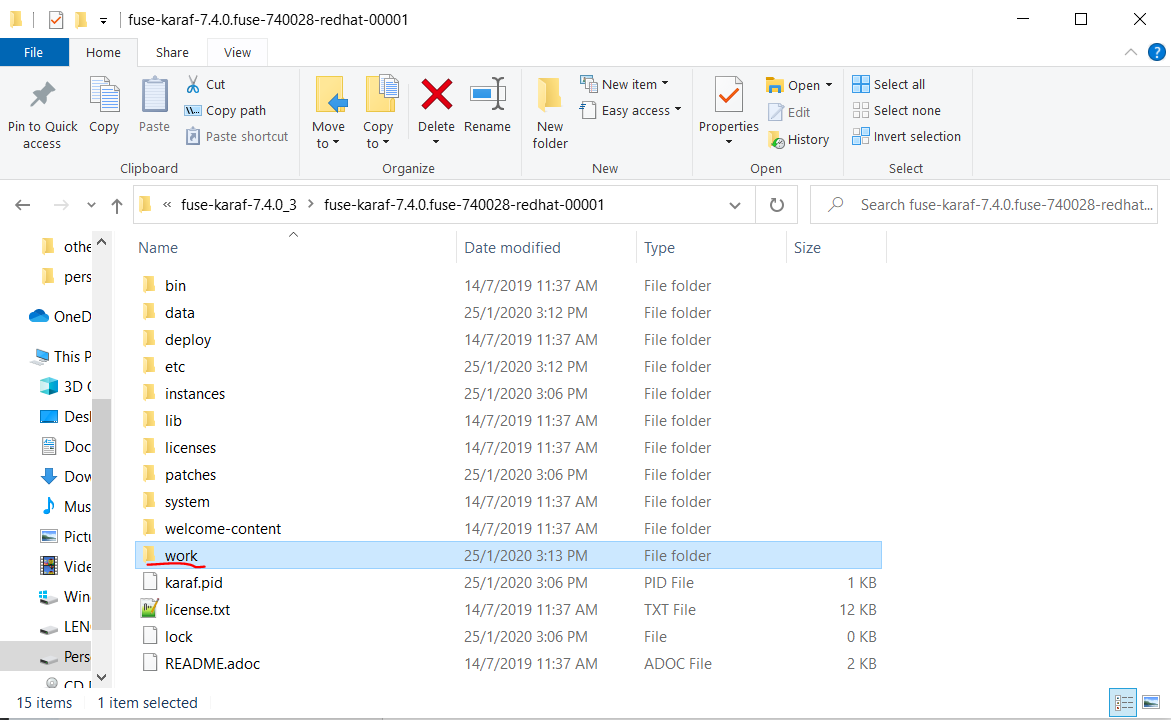
First go to your  fuse installation directory on your PC and then you could see following new folder created on there.

Newly created work folder inside the FUSE installation directory.

Then go to "\work\cbr\input
" directory and put sample person.xml file. Then put second person1.xml file on to the same directory. Based on our application logic data in two files should be saved in to the database and two files should move to "\work\cbr\output\others" directory. If you go to that spesific "\work\cbr\output\others" directory you could see those two files. Then go to your configured database and retrieve the data from person table. You could see data has been saved in to the database successfully.


Database table containing two records


You can download the entire source code from following GIT hub URL